Android Connection Issues with Wifibri
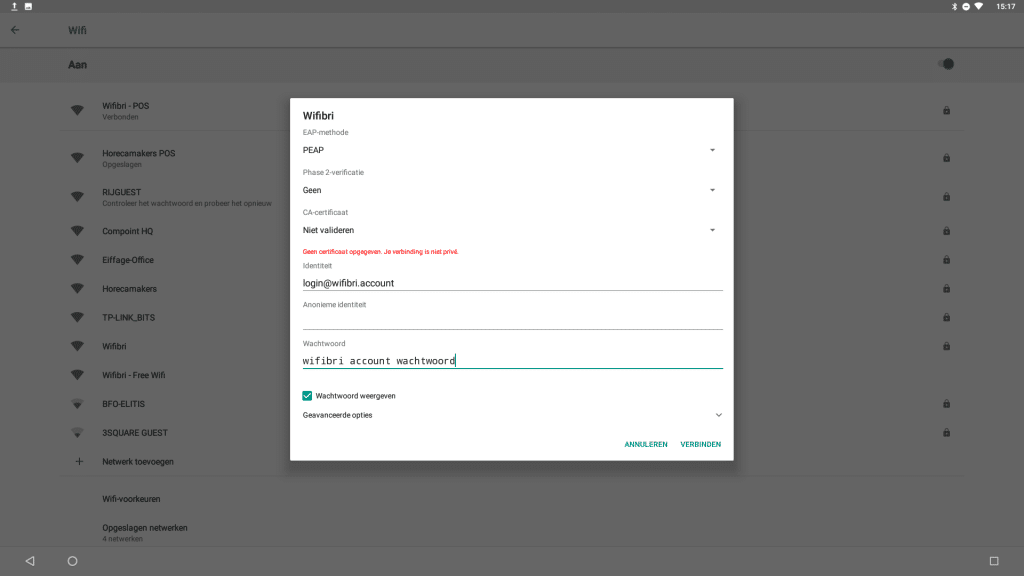
Some Android devices may experience difficulties connecting to the secure Wifibri network.
This is usually caused by Android requiring additional security settings before allowing the connection.
Before You Start
Make sure that:
- You have an active Wifibri account.
- Your username and password are correct.
- You are connecting to the Wifibri network and not Wifibri Public.
Connection Settings
Use the following settings when prompted by Android:
| Setting | Value |
|---|---|
| EAP Method | PEAP |
| Phase 2 Authentication | MSCHAPV2 |
| CA Certificate | Do not validate / Don’t verify |
| Domain | Leave empty |
| Identity | Your Wifibri username |
| Anonymous Identity | Leave empty |
| Password | Your Wifibri password |
Still Having Problems?
Try forgetting the network first:
- Open the Wi-Fi settings.
- Select Wifibri.
- Choose Forget Network.
- Reconnect using the settings listed above.
Need Help?
Contact Wifibri support and provide:
- The brand and model of your device.
- Your Android version.
- Any error message you receive.
Issues on Android Devices
Warning
Some Android devices may experience difficulties connecting to the secure Wifibri network.
On certain Android versions, it is no longer possible to select the option CA Certificate → Do not validate.
When this option is unavailable, connecting to the secure Wifibri network may not be possible.
This issue is most common on Android 11 and newer, although behaviour may vary depending on the device manufacturer and Android version.