Rebooting the WiBiBox
In some cases, connection issues can be resolved by restarting the WiBiBox.
Restarting the WiBiBox does not affect your settings or personal data.
Method 1: Power cycle the device
- Unplug the power adapter from the wall socket or switch off the power supply.
- Wait approximately 10 seconds.
- Reconnect the power supply.
- Wait a few minutes for the WiBiBox to fully boot up.
Method 2: Disconnect the network cable
In most WiBiBox installations, power is supplied through the network cable (PoE).
- Disconnect the network cable from port ETH1.
- Wait approximately 10 seconds.
- Reconnect the cable.
- Wait a few minutes for the WiBiBox to fully boot up.
Method 3: Restart via the web interface
- Log in to the WiBiBox web interface.
- Go to System.
- Select Reboot.
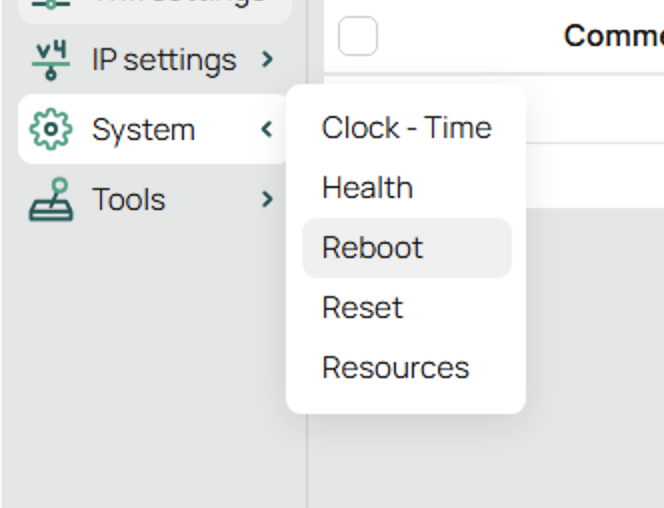
- Confirm the restart by clicking OK.

- Wait a few minutes for the WiBiBox to fully boot up.
Warning
During the restart process, Wi-Fi, wired network connections, and internet access will be temporarily unavailable.
During the restart
The following services will be temporarily unavailable while the WiBiBox is restarting:
- Wi-Fi
- Wired network connections
- Internet access
This is normal. Once the WiBiBox has fully restarted, all connections will be restored automatically.